
Search filters
Switch each filter on or off and drag them into the order visitors see on the course search page.
1Category
2Course level
3Language
4Price range
5Minimum rating
A multilingual WordPress theme with courses, lessons, progress tracking and subscriptions, plus a members list and group chat inside every course. No stack of third-party LMS, community and e-commerce plugins.
Sell your own courses through built-in enrolment and keep 100% of every sale, with no platform commission.
Charge for memberships and recurring subscriptions, let instructors publish their own courses, and sell featured placements, all managed from the admin.
Build structured courses with modules, video and text lessons and downloadable materials. Drag lessons into order, with no LMS plugin required.
Each course has a Members tab and a Discussion tab, a group chat that only enrolled students can join. Members can also message each other. No forum plugin to wire up.
Build courses from sections and lessons, mark any lesson as a free preview, and let students tick lessons off as they go, with a progress bar and resume button.
Elementor-friendly: Easily customize and design your pages using the free Elementor plugin.
Course pages are stacks of blocks, such as curriculum lists, lesson players and pricing tables, arranged visually in Elementor.
View Live DemoBuild your course website faster with our Elementor block system. Pick, drag and drop pre-designed blocks into place.
Explore Our ThemesStudents enrol and track their progress, while instructors create and manage their own courses, and you approve everything from the admin.
Offer free courses to grow your audience and paid courses to earn. Sell a course once, or by monthly or yearly subscription with an optional free trial.
Sell site-wide membership plans and per-course subscriptions with recurring payments, with no membership plugin required.
Take card and PayPal payments through free gateway add-ons, with thirty-plus to choose from, and keep 100% of every course sale, with no platform commission.
One of the most powerful search systems on the market. Ajax search with custom filtering helps students find the right course by topic, level and price.
Let students rate and review every course. That social proof sells the next enrolment, and it is all moderated from the admin area.
Every student gets their own account with a personal dashboard showing enrolled courses, resume-where-you-left-off and completion progress. That cuts your support load.
Your website, your rules. Sell single courses or recurring memberships, with optional featured and homepage placements.
People learn on their phones, so course pages, the lesson player and the student dashboard all work on mobile, with 10 language packs included.
Choose a starting point for your course business. Make it yours in minutes.
One membership opens every course, live session and member group, under your own brand.

Coaches selling programmes in mindset, business, health and more.

Specialists teaching live cohorts and sharing their playbooks.

Self-paced courses and live cohorts with a community around them.

For creators who build, sell and grow their own online courses.

Courses, live cohorts and coaching inside one members-only community.

Structured courses with lessons, community and progress in one place.

Skills for creators, from AI video to design, marketing and music.

Learners take the same course together, with live classes and a group that keeps them going.

How to plan, build and grow an online course website that students finish, and come back to. 34 pages, from choosing a niche to your first 90 days.
Courses, lessons, search filters and member checks are all set from one dashboard instead of a stack of LMS plugins.
Open the admin demoSwitch each filter on or off and drag them into the order visitors see on the course search page.
Build each course from video, text or embedded lessons, grouped into sections, with free previews before students enrol.
New courses, members and comments over 7, 30 or 90 days, a to-do list of orders waiting for you, and every other screen one click away.


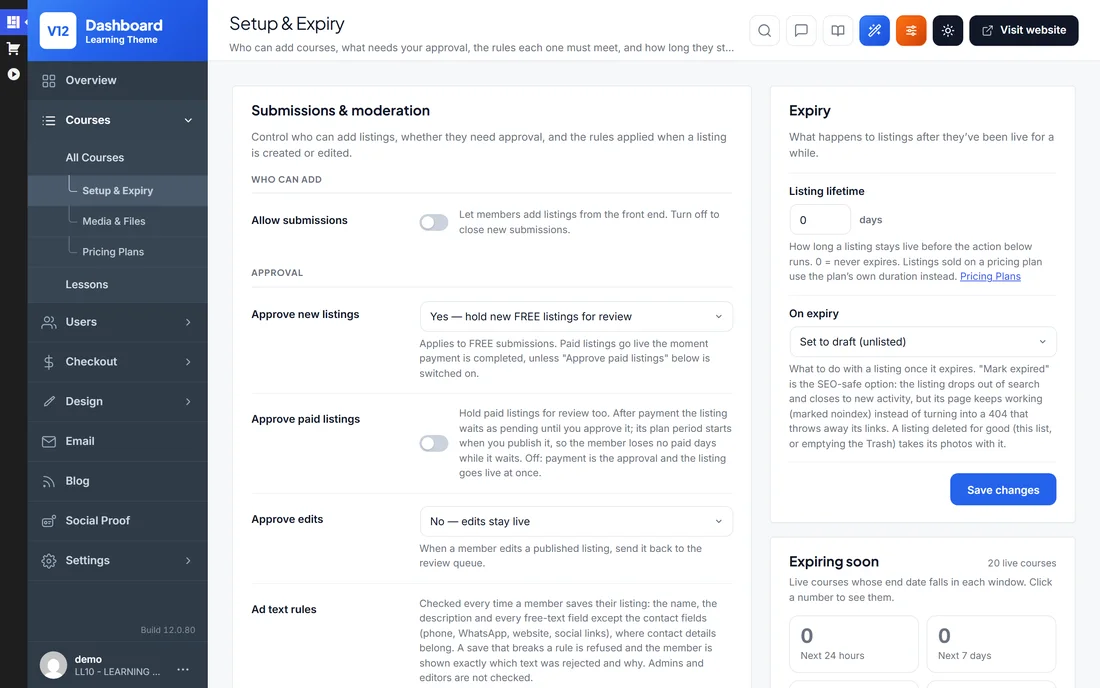

Hold new free courses for review, and choose what happens to a course when its time runs out.
Ask members to confirm their email or phone before they can use their account, or upload a photo ID for a Verified badge.
Members confirm their email address by clicking a link we send them.
Members confirm their phone number with a 6-digit code.
Approved members get a Verified badge.
Connect your own AI account, describe your course site, and the generator lays out the pages. Ask for changes in plain English or move the blocks yourself.

Every email the site sends is ready to go. Edit the wording of any of them, or switch one off.
Pop-ups and bars that show visitors what is happening on your course site, such as new courses, purchases, reviews and how many people are browsing right now.
Text members through Twilio, Vonage, MessageBird or Plivo, and take payments through PayPal, Stripe and 140 more gateway plugins.
These are the plugins most course sites end up installing. With the LMS theme they are already there, switched on from the admin area.
Restyle course pages, headers and landing pages in the free Elementor page builder.
Course grids, subject chips, community cards and pricing sections.
English plus 10 language packs. Every label can be translated.
PayPal, Stripe and 144 more free gateway plugins for your own merchant account.
Video, text and embedded lessons in sections, with free preview lessons.
Sell membership plans, each with its own price, length and features.
Charge instructors to list a course, with packages you set up.
Category, course level, language, price and rating filters, in your order.
Students rate and review courses. You approve and reply.
Hosted community platforms like Skool charge every month and host your members for you, while WordPress LMS plugins bolt community on as an extra. This is one complete WordPress theme with courses and a course community for a single price, on your hosting, your rules.
| WordPress LMS Theme | Skool | LearnDash | |
|---|---|---|---|
| Price | $99 one-time | $99/mo | $259+/yr |
| Courses + community together | Built in | Built in | Community is an add-on |
| Subscriptions with free trials | Built in | Built in | Built in |
| Self-hosted, you own the data | Yes | No, hosted for you | Yes |
| Unlimited installs | Yes | One community per plan | 1 site (base licence) |
| Members can list their own courses | Yes (payouts are manual) | Single community | Add-on |
| Renewal / monthly fees | None | $99 every month | Yearly renewals |
| Works with Elementor (free) | Yes | No | Theme-dependent |
Six simple steps to your own online course website. Sell your courses on WordPress, keep every payment, and never share a penny with anyone else. No coding required.
Upload the WordPress LMS Theme to any WordPress site under Appearance → Themes → Add New → Upload Theme, then activate it.
Enter your licence key in the admin area to switch on updates and support. One licence covers unlimited installs on sites you own.
Run the one-click demo import so your site instantly looks like our live demo, ready to customise.
Create courses with sections and video, embedded or text lessons, mark free preview lessons, or let instructors add their own.
Set up free and paid enrolment, memberships and your payment gateway so students can pay and access courses.
Use the ready-made Elementor design blocks to style your pages and layout, then launch your online course website.
The questions we hear most before people buy. Still unsure? Our support team is happy to help.
Install the WordPress LMS Theme, import the demo academy and start adding your courses, lessons and pricing from the admin area. Student accounts and payments are built into the theme, and none of it needs code.
Yes. The WordPress LMS Theme runs online course websites in the style of Udemy or Teachable. With a members list and group chat inside every course, it also runs a course-and-community site in the style of Skool. All of them come with member accounts and built-in payments.
Yes. It combines courses with a community inside each course, a members list and a group chat for enrolled students, plus member-to-member messaging. It follows the course-plus-community model of Skool, but self-hosted on your own WordPress site. You pay once instead of a monthly fee, own your data and members, and there are no per-member charges. It has no site-wide activity feed or live video classes.
Yes. Every course has a Members tab and a Discussion tab where enrolled students talk in a group chat, and members can message each other. You can sell courses, course subscriptions and site-wide memberships in the same place.
Yes. Each course can be a one-time purchase or a monthly or yearly subscription, with an optional free trial. A trial can only be used once per account.
Yes. Students enrol in free or paid courses, work through video, embedded or text lessons, mark lessons complete and resume where they left off. The theme does not include quizzes, certificates or drip scheduling.
Yes. Course pages, curriculum sections and landing pages are assembled from ready-made blocks in the free Elementor page builder, with no theme files to edit.
Yes. One-click demo content sets up your site to look like our live demo. You get a ready-made online course website that you can then fill with your own content and branding.
No. Everything in the WordPress LMS Theme is managed from the admin area, and it works with the free Elementor page builder for drag-and-drop editing. Step-by-step video tutorials and documentation are included.
Yes. Students learn on phones and tablets as much as laptops, so course pages, lesson players and dashboards resize to fit every screen.
Yes. One User License covers unlimited course sites you own, so you can run separate academies per subject if you like. Building course sites for clients falls under the Developer License.
No. An education site asks students to trust you with accounts and payments, and a nulled theme with no updates and possible malware undermines exactly that. Buy once and you get 6 months of updates and support plus a 14-day money-back guarantee.
Every purchase has a 14-day money-back guarantee. If the WordPress LMS Theme isn't right for you, contact us within 14 days for a full refund.
Every WordPress LMS Theme purchase includes 6 months of free updates and support, keeping the theme compatible with the latest version of WordPress. After that you can optionally extend updates and support for $49 per 6 months.
No. There are no hidden costs or forced premium plugins, and the online course theme works with free plugins such as Elementor. Everything you need to run an online course website is included. The only optional extra is extended updates and support after the first 6 months, at $49 per 6 months if you want it.
“Mark has been really helpful and really made a difference . Amazing theme, really happy with my purchase. Thank you!”

Aadhya
Sell digital downloads or build a marketplace similar to Themeforest, CodeCanyon or Gumroad.
Create your own AI headshot & video website similar to aragon.ai, headshotpro or artlist.io.
Sell your own products or affiliate products online from one ecommerce theme with the shop, checkout and payments built in.
Coming soon:WordPress Nonprofit Theme →
One-time $99 · unlimited installs · courses & community built in · 14-day money-back guarantee.